Adventures in Vert.x Redis Client Performance
Our seemingly idiomatic use of the Vert.x Redis client in our high-scale programmatic ad exchange caused high error rates and unacceptable performance. I dug into the details, only to learn that the fix is suggested in unrelated documentation and not provided in the library directly. The fix deserves to be a first-class usage pattern in the library, not a suggestion in error handling documentation.
Background
Sovrn is a supply-side programmatic ad exchange, handling millions of bid requests per second, and we run substantial business logic for each request. Our primary exchange application is written in Java, based on Eclipse Vert.x 5.0. We try to stay within the Vert.x ecosystem where possible to maintain a consistent threading and async model across our stack.
We have a few validation and enrichment processes for bid requests we run which are backed by AWS Elasticache Valkey clusters. These are typically scaled to our read load, which means they are relatively large, on the order of dozens of nodes per region.
Because programmatic advertising is latency sensitive, and we are cost sensitive, we track application performance and behavior with tracing, and we instrument quite extensive metrics into our code. We also use async-profiler to understand where the application spends CPU time, in part because we have a non-trivial ONNX-based inference workload running in-process that normal Java Flight Recorder is blind to.
Problem
As we added these Elasticache lookups to our application, we found that the performance of these Redis calls was surprisingly bad. We were seeing operations exceeding 10 milliseconds regularly, showing up in the 90th and even 75th percentiles. We get on the order of hundreds of milliseconds to run an auction that involves sending bid requests to other partners; 10ms is a default timeout for any callout we make, so this represents a substantial percentage of these lookups outright failing for us. We separately observed a substantial number of calls that weren’t timing out fail due to ConnectionPoolTooBusyException which is self-explanatory, but was not at all obvious as to how we were hitting this. We configured the client to have at least 1 connection to every Elasticache node per eventloop, so how could this result in exhaustion so often? We checked the CloudWatch metrics for Elasticache and saw absolutely nothing wrong. CPU utilization levels were 50-60%, there were basically no observable issues in latency, error rates, everything looked suspiciously quiet. This pointed strongly to the problem living on the client side.
The situation was clearly worse than the latency and errors showed when we turned to async-profiler. We learned that we were spending an inordinate amount of time with Redis client code on the CPU. We were running at most 3-4 GET operations per request handled, yet we found that CPU samples in the Redis client code were hovering around 12% of total samples. We have a lot of other business logic, so this ratio is completely unreasonable—something was clearly wrong.
Because the application dutifully follows Vert.x’s async model, stacktraces tend to be fractured depending on where in a future chain the Redis call is actually made. The easiest way to aggregate this data was to sum up CPU samples contained in or above (in the call stack) the Redis client, in the io.vertx.redis package. This isn’t perfect but is a good approximation. This is how we arrived at the 12% number of total CPU samples, and this remained consistent across profiles collected at different times and different processes. We know that our code calls into the Redis client with RedisAPI.get so we can take a peek at a flamegraph of the CPU profile rooted in that call:
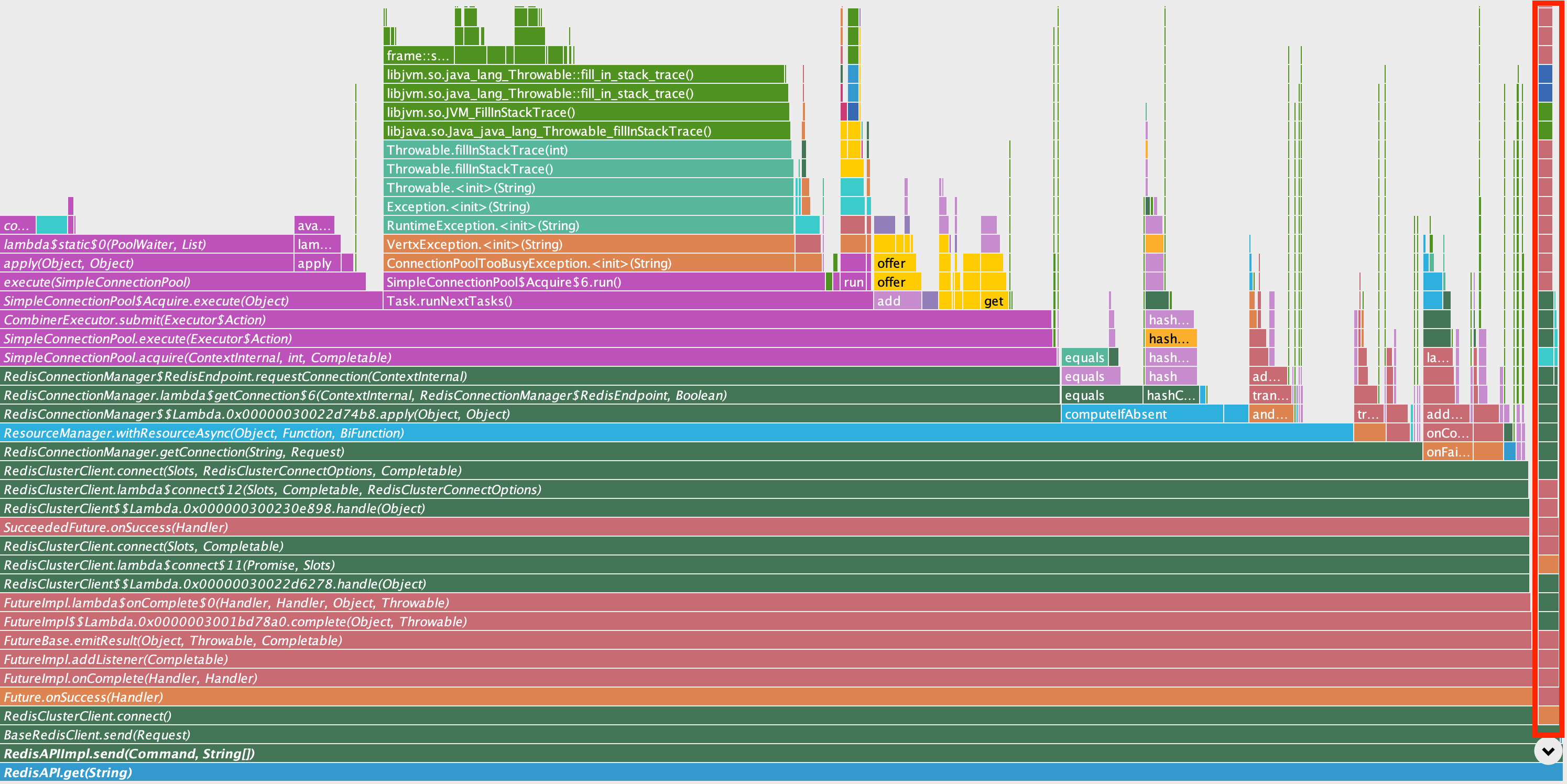
This section of the flamegraph shows a lot going on, but the narrow red rectangle on the right appears to be the stack involved with actually sending the command directly. Nearly everything else here is related to pool bookkeeping or handling for pool exhaustion.
From here, we dug into the structure of the callstack of these samples:
RedisAPI.get
└── RedisAPIImpl.send
    └── BaseRedisClient.send
        └── RedisClusterClient.connect
            ├── SimpleConnectionPool.lambda$static$0
            ├── SimpleConnectionPool$Slot.context
            ├── ResourceManager.withResourceAsync
            ├── FutureImpl.addListener
            └── [if pool exhausted]
                └── fill_in_stack_trace (for ConnectionPoolTooBusyException)
            └── [if connection acquired]
                └── PooledRedisConnection.send
                    └── libc.send / libc.write
There is another stack pattern around SimpleConnectionPool.close which showed relatively negligible overhead also related to bookkeeping for the connection pool. So pooling is clearly in the mix of where time is spent in the Redis client, but understanding why this interaction takes so much time warrants exploring the structure of the client itself.
Client Anatomy
Looking at the documented examples provided for the library, a simple way to construct a usable, sharable API client is something like:
var client = Redis.createClient(vertx, redisOptions);
var redisApi = RedisAPI.api(client); // returns a RedisAPIImpl

var futureResponse = redisApi.get("key");
This snippet appears innocuous but the interaction with connection pooling is completely hidden.
There are two interfaces involved in this example:
Rediswhich drives the fundamental client interactions: connect, send a command, send a batch of commands, close a connectionRedisAPIwhich is generated code to expose all Redis API commands as Java methods, delegating toFuture<@Nullable Response> send(Command command, String... args)
We see from the call tree above that RedisAPI.get is our entrypoint:
redisApi.get("key")just callsRedisAPI.send(Command.GET, "key")- this hits
RedisAPIImpl.send(Command, String...)which does 2 things: a. constructs aRequestfrom the command and args b. callssend(Request)on either aRedisConnectionorRedisinstance depending on construction. This example uses aRedisClusterClientwhich is aRedis RedisClusterClientuses thesend(Request)method fromBaseRedisClientwhich is short and obvious (ignoring some pre-checks not relevant here):return connect() .compose(conn -> conn.send(request) .eventually(() -> conn.close() .onFailure(LOG::warn)));So basically:
connect()and thensend(request)and finallyclose()on the connection returned.
The surprising part is what RedisClusterClient#connect() does: create a RedisClusterConnection and add to it a leased connection to every node in the cluster, keyed by endpoint from the cluster’s topology. If you have a cluster with dozens of nodes, connect() will return a connection object with dozens of leased connection objects. Using this connection, we send a GET "key" on exactly one of those connections, depending on which shard owns that keyrange. For this 1 operation: lease dozens of connections, find which shard holds the key range, choose one of the connections among the shard master+replicas, send this 1 command on 1 connection, then release dozens of leases.
The Problem
The pool bookkeeping overhead for this is massive, but this also creates unnecessary contention around the pools for every node because the leases are all held for as long as the operation takes, despite all but 1 node being completely idle in this call. Used this way at scale, we frequently observed spikes of ConnectionPoolTooBusyException, or RedisConnectException which also indicates that a node’s connection pool is exhausted, with nearly all outstanding leases never actually seeing use.
The real travesty about this situation is that the Redis protocol—and this client in particular—supports pipelining, which allows sending requests without waiting for previous responses. The default setting for pipeline depth (outstanding requests against a connection) or maxWaitingHandlers is 2048 per connection. This applies to a connection to a node, not RedisClusterConnection which is a collection of 1 connection each to every node. This means the actual concurrency against a single node connection is very high, but the flow above makes this effectively impossible because the lease for the only connection that is actually used for the GET is held for the entire round trip of that one operation. Not only is the single node connection exclusively leased for the whole operation, but the entire group of connections held in the cluster connection is leased for that time.
Altogether, the idiomatic pool-based usage pattern for this client is a non-starter for any sort of meaningful scale.
Guidance in Documentation
In Vert.x Redis client documentation, there’s a note about usage under the Implementing Reconnect on Error section about how to use the client “for performance”:
While the connection pool is quite useful, for performance, a connection should not be auto managed but controlled by you. In this case you will need to handle connection recovery, error handling and reconnect.
This usage pattern is not directly supported in the client library, though further down in this section, a sample implementation is provided. The docs do not, however, clarify what “performance” needs might warrant this. Considering the findings above, the snippet obviously fits the scenario we’ve observed. Unfortunately, it’s quite ambiguous and easy to miss considering it’s nested in a section about error handling and not performance.
Solution
Following the obscure guidance in error handling documentation mentioned above, we implemented the sample code the documentation includes, with a key adaptation to hold one connection per eventloop thread. The sample code acquires a RedisClusterConnection and holds onto it, reconnecting only when necessary. This means we have a connection to every node with no leasing per command, and can actually drive the pipeline substantially for any given connection.
Because our application is organized around a multi-reactor architecture, we have a fixed set of eventloops doing the (non-blocking) work, and we can hold (and re-acquire only when necessary) a single RedisClusterConnection per eventloop thread. This dramatically simplifies the client configuration because we only need roughly 1 connection per node per event loop. The application does not remotely approach 2048 outstanding bid requests per event loop, and we impose a hard concurrency limit above which we shed additional bid requests, so the pipeline depth is never threatened even if somehow all operations on an event loop happened to hit just 1 node.
Impact
After this change was deployed, the first indication that this helped was in our metrics. The ConnectionPoolTooBusyException almost completely disappeared, which makes sense because we were no longer interacting with a pool for each operation except when replacing the long-held connection. The latency distribution also dropped off a cliff across the board. We went from frequently timing out at the 90th, 75th, and sometimes even 50th percentiles to only occasionally seeing the 99th percentile briefly peak over 10ms. This was huge; we cut out the vast majority of failures on these lookups.
Just as with uncovering the problem, profiling data held more good news, showing that this change reduced CPU samples in the Vert.x Redis client to 3.8%. We originally found this issue in profiling data showing about 12% of CPU samples in the Redis client, so we essentially reduced total CPU usage by about 8%. This was a big win for a relatively simple change based on some direct guidance from the docs, even if they were “hidden” under a section that was seemingly unrelated to performance.
When you run hundreds of instances of your application, an 8% reduction in CPU usage isn’t just a nice optimization; you feel it in your infrastructure footprint. This change resulted in a reduction of dozens of instances, freeing up hundreds of CPUs, which had a substantial impact directly on our EC2 cost. It is always rewarding when a real performance problem leads to a fix that has a direct, substantial impact on the company’s bottom line.
This kind of impact demonstrates exactly why this usage pattern deserves to be a direct, idiomatic access pattern in the Vert.x Redis client. Users should be nudged in the direction of using this when performance matters, and the code for this should exist in the library itself, not in a snippet in documentation. Examples should put this front and center, especially when the topology of the Redis system is anything but trivial. The connection-pooled pattern simply doesn’t scale reasonably to larger Redis deployments, and while some grit in this situation clearly paid off for us, this is a painful gap that can easily sour other users earlier in their adoption journey.